Severe Weather Alerts
- 4.2
- Rating
- 100.00K
- Installs
- Free
- Price
 Analysis by App-foxy
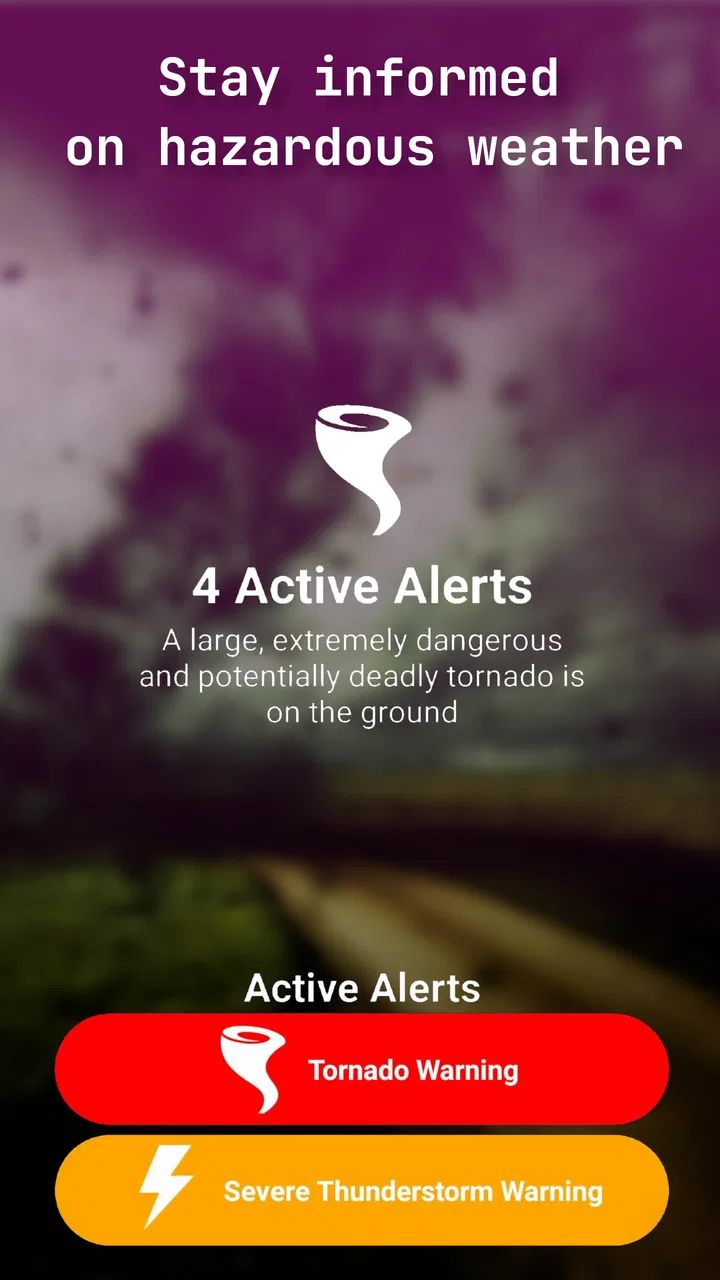
When severe weather is the thing I need to know about, I do not want a crowded forecast screen competing with the warning itself. Severe Weather Alerts takes a much narrower approach: it is a lightweight weather-warning app focused on hazards issued by the National Weather Service. I found that focus useful when I wanted a quick way to pay attention to dangerous conditions without turning weather checking into a daily research project.
The app is free to download and is suitable for everyone, although optional in-app purchases range from $1.99 to $19.99 per item. It is developed by Quinn Conrad, has reached over 100 thousand installs, and holds a 4.2 average from more than 500 ratings. Those figures suggest a small but established audience rather than a giant all-purpose weather platform. That distinction matters: I would choose it for warning awareness, not as my only source for detailed forecasts, radar analysis, or long-range planning.
What Severe Weather Alerts is really designed to do
The most important thing to understand is that this is not trying to replace every weather tool on your phone. Its job is to bring attention to hazardous weather information from the National Weather Service. That makes it especially relevant during thunderstorms, winter storms, flooding concerns, high winds, and other situations where an official warning matters more than a polished forecast display.
You May Also Like

 Blood Strike: 2.5 Anniversary
Blood Strike’s Loadouts Turn Every Drop Into a Tactical Gamble
A close look at Blood Strike’s custom loadouts: how fast access to signature weapons reshapes its battle royale rhythm, rewards preparation, and narrows the gap between fights.

 Pandora - Music & Podcasts
Pandora’s Music Is Easy to Start, but Harder to Recover
Pandora’s strength is its low-effort path from a seed to a station. Its weak spot is how much confidence it asks you to place in connection, setup, and quiet recovery.

 8 Ball Pool
 Is Built on Rivalries, Rematches, and Routine
A close look at the rivalries, rematches, shared routines, and unanswered safety questions that turn a quick pool match into a persistent mobile community.

 Samsung Music
’s Quiet Strength Is Playing What You Already Own
Its reach comes less from spectacle than from dependable access to a personal library. That simplicity is both the app’s strongest retention engine and its ceiling.

 AccuWeather: Weather Radar
AccuWeather Review: A Quick, Clear Forecast for Everyday Decisions
For everyday plans, the best forecast is the one you can understand quickly. AccuWeather makes rain timing, radar, and local conditions easy to act on, with a few trade-offs.

 Hill Climb Racing
Why Hill Climb Racing Still Turns Crashes Into One More Run
A tiny car, a bumpy hill and one more upgrade: Hill Climb Racing keeps resurfacing because its simple chaos makes every near-miss feel personal.
More From Our News Desk



I like this focused idea because severe weather information can get buried inside conventional weather apps. Many mainstream alternatives lead with temperature, hourly conditions, pollen, air quality, maps, and promotional panels. Those features are useful, but they can also make the urgent part harder to notice. A dedicated warning app has a simpler purpose: help me recognize that something potentially dangerous is happening and decide what to do next.
That simplicity also creates a limitation. A warning is not the same as a complete forecast. It may tell me that a hazard affects an area, but I still need broader weather information to plan clothing, travel time, outdoor work, or a multi-day trip. If I wanted one app that handled forecasts, radar, satellite imagery, severe alerts, and local conditions in one place, I would probably prefer a full weather service. Severe Weather Alerts makes more sense as a focused companion.
Why the National Weather Service connection matters
For serious weather decisions, I would rather start with an official warning source than depend entirely on an attractive interface or a crowd-sourced report. The app’s stated purpose is tied to National Weather Service hazards, which gives its central role a clear boundary. It is not asking me to treat every dramatic-looking weather update as equally important.
That does not mean I would blindly rely on a phone notification in an emergency. Weather warnings can change quickly, phones can be muted, and local conditions can differ from what appears on a screen. My practical habit would be to use this app as one layer of awareness, then check official local guidance and take sensible action when a warning affects my area.
One useful distinction is between a watch, an advisory, and a warning. Even without treating the app as an educational course, I would still read the wording carefully rather than reacting to every alert in the same way. A warning generally deserves faster attention than a routine advisory, while a watch is more about preparation for possible development. That habit is more valuable than simply installing another weather icon.
The experience of using a focused warning tool
My favorite aspect of this kind of design is the reduced mental load. When weather is calm, I do not need to scroll through a dozen charts. When conditions turn threatening, I want the relevant message to stand out. Severe Weather Alerts is appealing to people who prefer a direct warning workflow over a dashboard full of numbers.
A realistic example would be a parent deciding whether to leave work before an evening storm. A general weather app might show a dark cloud, a rain probability, and a radar animation. A warning-focused tool can add a more important question to the decision: has an official hazard been issued for the area I need to cross? I would still check traffic and local instructions, but that warning context could change whether I leave immediately, wait indoors, or alter the route.
Another example is outdoor work. Someone preparing a community event, sports practice, or construction shift may not need a minute-by-minute forecast all day. They may need a clear signal when dangerous weather becomes an official concern. In that situation, the app’s narrow purpose can be more useful than a feature-rich forecast application that requires constant interpretation.
Trust, permissions, and visible choices
Because this app deals with location-sensitive weather information, I would pay close attention to the choices shown during setup and in the phone’s system settings. The practical trust question is not simply whether the app is free. It is whether I can understand what access it requests, decide whether that access is necessary for my use, and change my mind later through the operating system.
I would avoid granting any permission automatically. If the app asks for location access, I would consider whether I want precise location, approximate location, or no location at all, depending on the controls presented by my device. If I only need warnings for a chosen area, manually selecting a place would be preferable to sharing continuous location. If the app requires a permission for a function I do not plan to use, I would leave it disabled and see whether the essential warning experience still works.
This is also where I would separate verified user control from assumptions. The app’s public description establishes its weather-warning purpose, but it does not give me a reason to invent a detailed privacy story. I would inspect the permission prompts, the app’s settings, and the relevant store privacy information myself. That is a healthy routine for every weather app, especially one that may be used around home, work, school, or travel locations.
Account control is another practical consideration. I prefer apps that let me use their core function without unnecessary registration, but I would not assume that Severe Weather Alerts has or does not have an account requirement without seeing the current setup flow. If an account is offered, I would ask whether it is genuinely needed for saved locations or optional services. If there is no account, that can make the app easier to try and easier to leave.
Handling sensitive moments without overreacting
Severe weather alerts are inherently attention-grabbing, so notification behavior deserves deliberate setup. I would review which alerts are enabled, how prominently they appear, and whether the phone permits them during quiet hours or other interruption controls. A warning app that is muted completely may fail at its main job, while one that sends more interruptions than I can tolerate may encourage me to disable everything.
My preferred approach would be to keep important hazard notifications available, then adjust sound and interruption settings at the phone level. I would also check the app after installing it rather than assuming the default behavior matches my routine. Someone who works nights, cares for a baby, drives frequently, or lives in an area with frequent weather advisories may need a different balance from someone who only wants occasional updates.
I would also avoid treating an alert as a complete instruction. The best response depends on where I am, the building I am in, the severity of the hazard, and guidance from emergency authorities. An alert can prompt me to move indoors, check a safer room, postpone travel, or monitor developments, but it should not encourage risky behavior such as driving toward a storm to verify what the app says.
Three practical habits that make the app more useful
First, I would configure the app before storm season or before a trip, not during the first emergency. That means checking notification permission, reviewing location choices, and making sure the phone’s battery and system notification settings will not silently block warnings. The small amount of preparation is worthwhile because troubleshooting during a storm is exactly when I have the least patience.
Second, I would pair the app with a simple personal response plan. For a household, that might mean knowing the safest indoor area, keeping essential items together, and deciding how family members will communicate if travel becomes unsafe. The app can provide awareness, but it cannot replace a plan. This is a key trade-off compared with apps that present a much broader set of preparedness material.
Third, I would use the warning as a trigger to verify the affected area rather than assuming every notification applies equally to me. Boundaries matter. A warning can cover a wide region while conditions at my exact location differ, or a nearby hazard can still be important even if I am outside the most serious zone. I would read the alert details, compare them with my route and plans, and consult official local updates when the situation is serious.
A less obvious benefit of this workflow is that it reduces notification fatigue. Instead of enabling every possible weather message and eventually ignoring the phone, I can reserve my attention for hazard information and use a separate forecast source for ordinary rain or temperature checks. The trade-off is that I must accept a two-app routine if I want both focused alerts and detailed forecasting.
How it compares with ordinary weather alternatives
Compared with the default weather app on an Android or iOS device, Severe Weather Alerts appears more specialized. Default apps are convenient because they are already present and usually combine current conditions, forecasts, maps, and alerts. They are better for everyday questions such as whether I need a jacket tomorrow or when rain is likely to stop. The dedicated app is more appealing when the warning itself is the priority.
Compared with large commercial weather platforms, the difference is even clearer. Those services often provide polished radar, model comparisons, widgets, video, lifestyle information, and many layers of personalization. I would choose one of them for trip planning or detailed storm tracking. I would choose this app when I want a lighter experience centered on National Weather Service hazards and do not need a full weather newsroom in my pocket.
Compared with official government weather tools, the choice depends on convenience and depth. An official website or government application may offer authoritative information directly, while a dedicated alert app may be easier for a quick mobile warning workflow. I would still keep an official source available for detailed instructions, especially during a major event. The app can shorten the path to awareness, but I would not confuse convenience with a complete emergency information system.
Who should install it, and who should skip it
I think Severe Weather Alerts is a good fit for people who want a focused warning layer without committing to a large weather platform. It may suit families, commuters, outdoor workers, travelers, and anyone living in an area where thunderstorms, flooding, winter weather, or high winds can disrupt plans. It is also a reasonable choice for someone who finds conventional weather apps too busy and wants alerts to have a clearer role.
I would be more cautious about recommending it as the only weather app. If you need detailed radar interpretation, aviation information, marine conditions, agricultural forecasting, precise hourly planning, or extensive historical and future views, a specialized alternative may serve you better. The same is true if you want a rich widget system or a single app for every weather-related task.
People who dislike notifications should also think carefully before installing a warning app. Its value depends on paying attention at the right time, but too many interruptions can lead to disabling alerts. I would rather configure fewer, meaningful notifications than install it and immediately silence the entire experience.
Version, cost, and the decision to try it
The current version is 2.2.4 and it supports devices running Android 6.0 or later. That broad minimum requirement makes it approachable for people using older compatible Android phones, although I would still check how the current release behaves on my particular device and how the operating system handles background notifications.
The app itself is free, which makes testing the warning workflow low-risk. Optional purchases run from $1.99 to $19.99 per item, so I would inspect what each purchase unlocks before paying. I would not assume that a paid option is necessary for the basic purpose of receiving severe weather information. My advice is to use the free experience long enough to decide whether its alerts, controls, and presentation actually fit your routine.
The Everyone content rating also makes it suitable for a broad household audience. That does not remove the need for adult judgment during dangerous conditions, but it does make the app easier to consider for shared family devices or for younger users learning to pay attention to weather warnings with supervision.
My cautious verdict after weighing the trade-offs
I see Severe Weather Alerts as a practical specialist rather than a complete weather replacement. Its strongest idea is the clearest one: keep attention on hazards connected with the National Weather Service instead of burying warnings inside an oversized forecast experience. For me, that focus makes sense as a companion app, particularly when I want a lightweight way to notice official severe-weather information.
Its trust value depends on how carefully I configure it. I would review permissions, choose the least intrusive location option that still supports my needs, examine notification controls, and avoid paying for extras before understanding them. Those steps are not unique to weather software, but they matter more when an app can influence urgent decisions and may be connected to places I regularly visit.
My recommendation is to treat it as an alert layer, not an emergency plan. Install it if you want a focused warning experience and are comfortable checking its visible controls yourself. Keep another reliable source for forecasts and official instructions, and do not let a phone notification replace common sense or local emergency guidance. With that realistic expectation, this free app from Quinn Conrad is worth trying for people who value direct severe-weather awareness over a feature-heavy forecast dashboard.
FAQs for Severe Weather Alerts
01What features does the Severe Weather Alerts app offer?
The Severe Weather Alerts app provides real-time notifications for various weather conditions such as thunderstorms, tornadoes, floods, and more. It includes a detailed weather map, hourly and daily forecasts, and customizable alert settings. Users can also access safety tips and track specific locations for personalized updates.
02How accurate are the weather alerts provided by the app?
The app uses data from reliable meteorological sources and advanced algorithms to ensure accurate and timely alerts. While the app strives for precision, users should always verify critical weather information with local authorities, especially during severe conditions, to ensure safety and preparedness.
03Is the Severe Weather Alerts app free to use?
The app offers a free version with basic features like standard alerts and forecasts. However, there is a premium subscription available that unlocks advanced features such as ad-free usage, extended forecasts, and enhanced alert customization. Users can choose based on their needs and preferences.
04How can I customize alerts in the Severe Weather Alerts app?
Users can customize alerts by selecting specific weather conditions they want to be notified about, such as tornadoes or heavy rain. The app allows setting alert thresholds and choosing notification methods like push alerts or emails. This ensures users receive relevant information tailored to their preferences.
05What should I do if I encounter issues using the app?
If you experience any problems with the app, you can access the help section for troubleshooting tips. Additionally, users can contact customer support via email or through the app's feedback form. Updates and bug fixes are regularly released, so keeping the app updated can also resolve many issues.
Pros
- Real-time alerts keep you updated.
- Customizable notifications for areas of interest.
- User-friendly interface with intuitive design.
- Accurate forecasts from trusted sources.
- Offline mode available for emergency situations.
Cons
- Battery drain due to frequent updates.
- Ads may interrupt user experience.
- Limited free features without subscription.
- Occasional delay in alert delivery.
- No integration with smart home devices.

Severe Weather Alerts
Gallery